Privacy
Privacy and security, in plain language.
This page explains what Praxis does with your information without legal or technical jargon. The short version: Praxis protects service data with transport, authentication, access, and provider safeguards. Your notes and Vault content go a step further with zero-knowledge encryption before they sync, so even Praxis cannot read them.
Zero-knowledge encryption
Only you can read your workspace
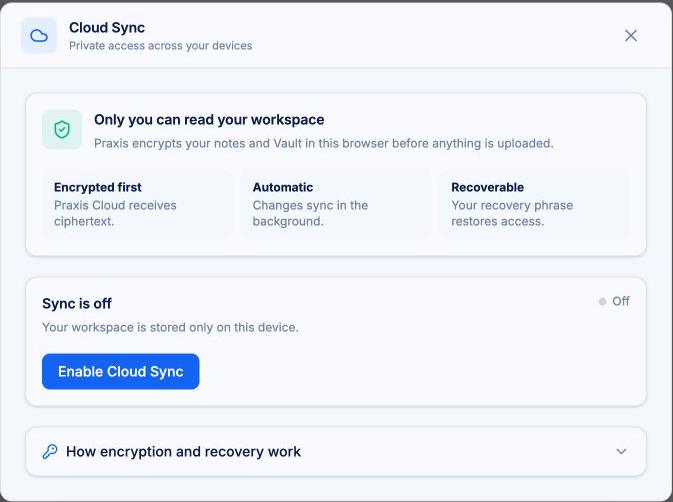
Note bodies, Vault records, and attachments are encrypted in your browser before they leave your device when sync is on. Praxis Cloud stores the encrypted result. It never receives the readable version.
Praxis creates a random master key that encrypts your workspace. Your password derives a separate wrapping key that protects the master key. Neither your password nor the readable master key is ever sent to Praxis.
Praxis cannot decrypt your workspace. The keys never leave your devices.
This is different from HTTPS/TLS transport encryption, which protects data while it travels. Praxis uses both, but only workspace content receives zero-knowledge encryption that keeps it unreadable to Praxis after it arrives.
How the encryption works
You do not need to know any of this to use Praxis. If you do want to know, here is exactly what happens under the hood.
Technical details, for the curious
- The wrapping key is derived from your password with PBKDF2 (600,000 iterations, SHA-256), entirely in the browser.
- Notes, Vault records, and attachments are encrypted with AES-GCM. Vault record envelopes are cryptographically bound to their record identity, so a record cannot be swapped or replayed.
- The recovery phrase is a 24-word, BIP39-style encoding of the 256-bit master key with an 8-bit checksum that catches transposed words.
- After setup, the master key is stored non-extractable. Session persistence uses an AES-GCM-wrapped envelope, so closing the browser session requires your password again.
- Trusted devices wrap the master key a second time using an origin-bound WebAuthn credential strengthened with HKDF-SHA256. Biometric data never reaches Praxis.
- Attachments are encrypted with AES-GCM, checked with SHA-256 integrity hashes, and uploaded to private cloud storage over short-lived, authorized requests.
Account data
What Praxis processes
Depending on the features you use, Praxis or its service providers may process:
- Your account email address.
- Authentication metadata.
- Subscription and payment status.
- Storage and quota totals.
- Requests made to the Search, News, or Images tools.
- Basic security, error, and abuse-prevention information.
- Support messages you voluntarily send.
Payment information is processed by Stripe. Praxis does not store full card details. The full data inventory lives in thePrivacy Policy.
Web traffic for these services is protected in transit with HTTPS/TLS. These categories are not zero-knowledge because Praxis or its providers must process them in readable form to authenticate, bill, secure, or support your account.
Search tools
What search tools mean for privacy
Search-tool queries must be processed to return results, and they are sent to the applicable search provider (Brave). Each tool run uses one daily search credit, and nothing runs until you press Run.
Universal search inside your workspace is different: it only looks at what is already on your device and never makes an external request on its own. When you save a tool result, it becomes Vault content, encrypted before sync like everything else.
Cloud Sync
Sync, across your devices
Cloud Sync is optional and part of the paid plan. On a second device, sign in, choose Unlock, and enter the same password. Cloud notes are pulled down and merged with local ones. After that, changes sync in the background within a few seconds of saving.
The sync indicator always shows the state: green when synced, red when something needs attention, Syncing while it works, and Offline when the browser is disconnected. You can enroll a trusted device (Touch ID or Face ID) for faster unlock; biometric data never reaches Praxis.
If the same note is edited on two devices, the most recent save wins. Sync covers notes, Vault items, and workflows; notes up to 240 KB encrypted sync to the cloud, and attachments use separate storage.
Recovery has limits
Your 24-word recovery phrase is the backup for your encryption key. Praxis shows it when you enable sync and does not keep a copy it can reveal later.
If you lose the phrase and forget your password, your synced data cannot be recovered. That is the point of real encryption, and it is also a responsibility.
Turning sync off
Disabling sync quarantines your cloud data, still encrypted, for 30 days. Re-enable any time in that window to restore everything.
After 30 days, the cloud data is permanently deleted. Your local notes are never affected.
The boundary moves when you export or share
Exporting, sharing, or sending material to an external tool changes the privacy boundary. Third-party links and results are governed by their respective sites and providers.
What we do not claim
Praxis does not claim to be unhackable, to guarantee complete anonymity, or to prevent all data loss. We do not use "military-grade" language or claim certifications we do not hold.
Security practices
Praxis uses HTTPS-only connections, modern authentication, and client-side encryption for synced content. Security is a process, not a promise. If you find a vulnerability, please report it topraxis-help@c13.io.
For the legal version of all of this, read thePrivacy Policy.
Bring your sources. Keep your train of thought.
Praxis runs on desktop and mobile web.
Free to start. Your workspace stays on your device until you turn on sync.
Not by demanding more of your attention.
Not by taking ownership of your work.
Not by thinking for you.
By giving your thinking room to work.
THINK IN PRAXIS.